Accessibility Checker
Accessibility Analyzer for WordPress
Audit your website according to WCAG 2.1 AA, EN 301 549, and BFSG. The Analyzer detects barriers, explains them in clear language, and provides concrete solutions – for greater legal certainty, better SEO performance, and higher conversions.

Integrated in MH-Accessibility Pro
Accessibility Analyzer with MH-Accessibility Pro
Audit your WordPress website according to WCAG and BFSG – detect barriers before warnings or legal issues arise.
Install
Install MH-Accessibility Pro in just a few minutes and get immediate access to all analysis and support features.
Analyze
The integrated analyzer checks your website and clearly shows which accessibility barriers are present.
Fix
Implement the recommended measures and improve your accessibility step by step.
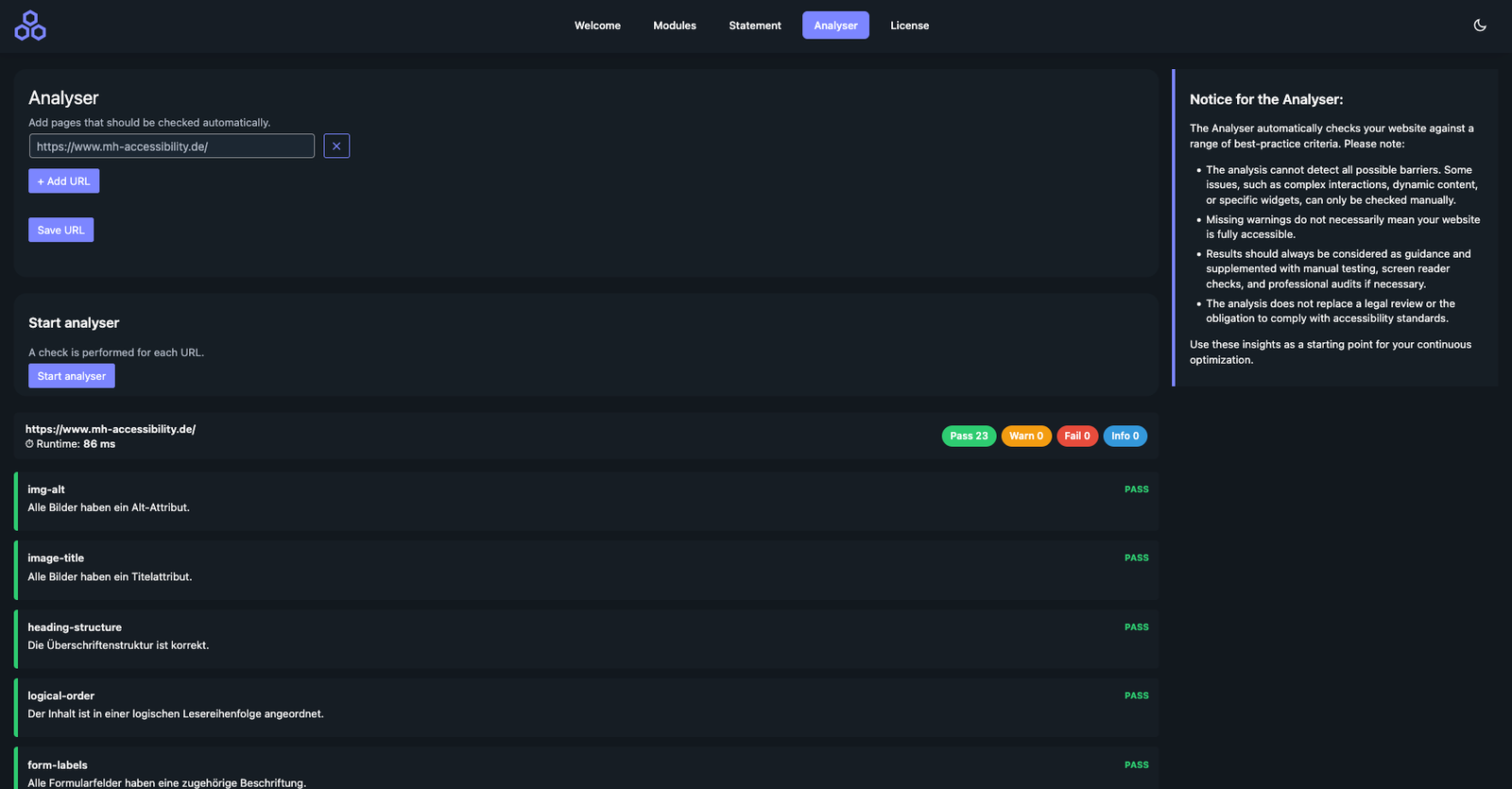
What the Analyzer specifically checks
Images & Media
Each check includes a technical analysis, WCAG reference, practical explanation, and actionable recommendation.
image-alt – alternative texts present
Screen readers rely on alt texts to read image content aloud. Google also uses these texts for image SEO.
image-title – title attributes set
Titles provide additional context information, for example for tooltips and assistive technologies.
iframe-title – iFrames labeled
Embedded content such as videos or maps must be clearly described so users can understand their purpose.
Structure & Semantics
heading-structure – correct headings
Clear hierarchies (H1 → H2 → H3) provide navigation for screen readers and a table of contents for search engines.
logical-order – logical reading order
The DOM structure matches the visual presentation – essential for screen reader and keyboard users.
html-valid – valid basic structure
Error-free HTML prevents display and compatibility issues with assistive technologies.
html-lang – language attribute set
Screen readers use the lang attribute to select the correct pronunciation and voice.
Forms
form-labels – fields labeled
Every input field needs a real
accessible-name – WCAG 2.5.3
Buttons and controls have a unique, machine-readable name for screen readers.
Contrast & Text
contrast-min – sufficient contrast
Minimum contrast ratio of 4.5:1 for body text according to WCAG 1.4.3.
contrast-enhanced – large text
For large text, 3:1 is sufficient – important for buttons and teasers.
text-resize – scalable
Content remains usable up to 200% zoom without loss of functionality.
Keyboard & Focus
keyboard-access
All functions can be operated without a mouse.
no-keyboard-trap
Focus can leave any area again at any time.
skip-link present
Users can skip navigation and jump directly to the main content.
Links & ARIA
link-purpose descriptive
Links such as “Read more” are not clear without context.
internal links correct
Targets exist, are focusable, and are meaningfully named.
aria-roles valid
Roles comply with the specification and do not create conflicts.
aria-live status messages
Dynamic content is correctly announced to assistive technologies.
Is your website legally compliant?
Check over 20 accessibility criteria automatically now